🌈 ESP32-S3 Rainbow: ZX Spectrum Emulator Board! Get it on Crowd Supply →
View All Posts
read
Want to keep up to date with the latest posts and videos? Subscribe to the newsletter
HELP SUPPORT MY WORK: If you're feeling flush then please stop by Patreon Or you can make a one off donation via ko-fi
#-OS-VS--O2 #BENCHMARKING #CODE-SIZE #COMPILER-OPTIMIZATIONS #EMBEDDED-PERFORMANCE #ESP-IDF #ESP32-S3 #FLASH-BANDWIDTH #INSTRUCTION-CACHE #MICROCONTROLLER #QIO #SPI-FLASH

Optimizing ESP32-S3 Performance: Why Smaller Code Can Ran Faster

I’ve been tuning the performance of some code recently on an ESP32-S3 project,

There was a slightly counter-intuitive result that might surprise some people: optimizing for code size produced faster runtime performance than optimizing for performance.

There’s a full video here - but you can skim this post for most of the information.

The Benchmark

This is just some code that I pulled out of my latest project. It’s not an official piece of benchmarking code. So your mileage will definitely vary and you shohld do your own tests on your own code.

I kept my test case was deliberately simple and pulled out the most performance critical part of my code.

The code, input data, and hardware stayed constant throughout. Only ESP-IDF configuration options were changed between runs.

Baseline Results

Starting from a stock ESP-IDF configuration (I used their hello_world starter app), the decode took roughly 1.4 seconds.

From there, I explored a few of the usual performance levers:

  • CPU frequency (an obvious one!)
  • Compiler optimization level
  • Flash SPI mode
  • Cache configuration

CPU Frequency: The Obvious Win

Unsurprisingly, increasing the CPU frequency from 160 MHz to 240 MHz produced an immediate improvement.

The result was roughly the 1.5× speed-up thst you woulld hope for (it was actually around 1.46 - but close enough).

Compiler Optimizations: Size vs Speed

ESP-IDF menu config offers two commonly used optimization modes:

  • Optimize for size (-Os)
  • Optimize for performance (-O2)

Weirdly, in my first job (many years ago!), this was discussed in quite detail.

You naively expect that -O2 should be faster than -Os. In this case, it wasn’t.

With this workload, -Os outperformed -O2 quite significantly. They both beat the debug build - but -Os improved it the most.

Why Would Smaller Code Be Faster?

On the ESP32-S3, application code normally runs from flash memory with an instruction cache (you can actually copy code into PSRAM if it’s available which can be faster than flash).

Flash is pretty slow which means the CPU caches can have a significant impact.

  • instruction cache size
  • cache line fetches
  • cache miss penalties

Optimizing for performance often:

  • increases inlining
  • unrolls loops
  • duplicates code paths

All of this increases code size, which can lead to more instruction cache misses and more reads from the flash.

Optimizing for size does the opposite: it produces tighter code that is more likely to stay resident in the cache, reducing stalls caused by flash fetches.

In this workload, that effect outweighed the benefits of more aggressive instruction-level optimizations.

Flash Mode and Cache Configuration

Because the GIF was embedded in flash and accessed frequently, flash bandwidth also mattered.

Two changes helped further:

  • Switching the flash SPI mode from DIO to QIO (chack that your module supports this!)
  • Increasing instruction and data cache sizes to their maximum values

These changes reduced the cost of cache refills and improved overall throughput.

Interestingly, once the caches were enlarged, -O2 did improve — but it still didn’t beat the -Os configuration with the same cache settings.

The Winning Configuration

For this benchmark, the fastest setup was:

  • CPU frequency: 240 MHz
  • Compiler optimization: Optimize for size (-Os)
  • Instruction & data cache: maximum (turn it up to 11!)
  • Flash SPI mode: QIO

This combination produced the lowest overall decode time.

This is the case for my specific workload!

It’s important to be clear about the limits of this result.

You may not see the same behaviour if:

  • Your hot code runs entirely from the instruction cache or IRAM
  • Your workload is dominated by tight math loops on small datasets
  • You’re memory-bandwidth bound on internal RAM rather than flash

In those cases, -O2 or even more aggressive optimization may still win.

Full Results Table

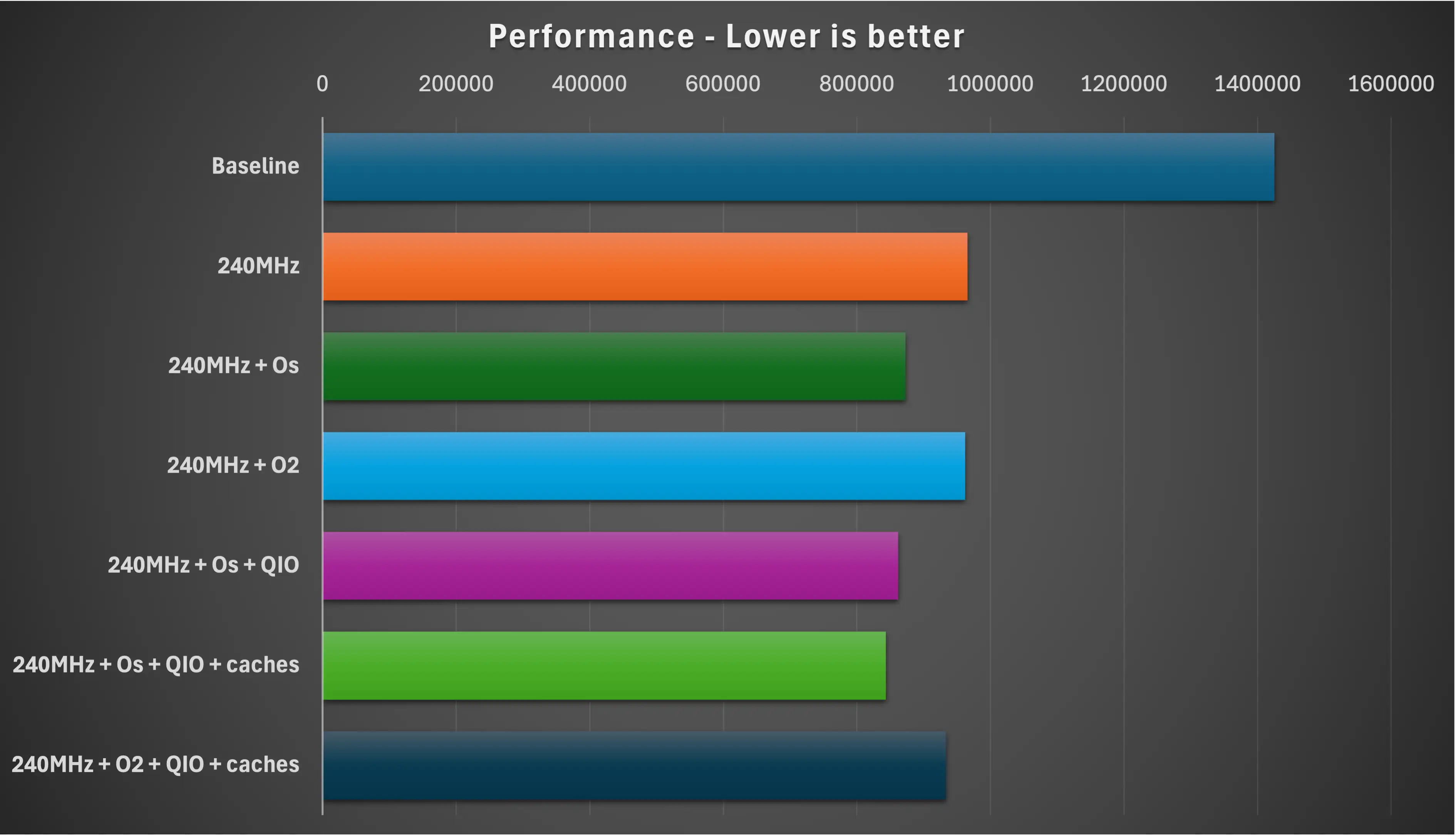
Build type usecs ms % of baseline
Baseline 1425476 1425.48 100
240MHz 965408 965.4 67.72
240MHz + Os 872495 872.5 61.21
240MHz + O2 962329 962.3 67.50
240MHz + Os + QIO 861859 861.9 60.46
240MHz + Os + QIO + caches 843286 843.3 59.16
240MHz + O2 + QIO + caches 933093 933.1 65.46

Chart

Conclusions

Performance is often limited by memory and caching, not raw CPU execution.

Smaller code can mean fewer cache misses - and fewer cache misses can mean faster code.

If you’re working on performance-critical ESP-IDF projects, it’s worth benchmarking -Os alongside -O2.

If you’ve tried similar experiments on other ESP32 variants, I’d love to hear what you found.

#-OS-VS--O2 #BENCHMARKING #CODE-SIZE #COMPILER-OPTIMIZATIONS #EMBEDDED-PERFORMANCE #ESP-IDF #ESP32-S3 #FLASH-BANDWIDTH #INSTRUCTION-CACHE #MICROCONTROLLER #QIO #SPI-FLASH

Related Posts

ESP32-S3 USBMSC - Can we make it faster? - After lots of tinkering, I've managed to improve the speed of writing to the SD Card of my ESP32-TV considerably, but it's still not as fast as I'd like. The Arduino 'readRaw' and 'writeRaw' functions were the culprits, they can only write one sector at a time! After bypassing this and using IDF functions, writing speed improved by 70%. I also experimented with writing to the SD Card in the background, which ironically yielded even better results. However, it's still slower than I'd like, so I've got a crazy new plan: using a cheap IC (GL823) for SD card interfacing and a USB multiplexer switch to swap connections between ESP32 and GL823. It's a wild ride, but that's how we make progress!
Minimalist Microcontroller: Building a Bare-Bones Dev Board - In a thrilling DIY endeavour, I attempted to build the most minimalist ESP32 dev board possible. Diving deep into the schematic of the ESP32 S3 WROOM module, I chopped out the non-essentials and whittled our needs down to bare bones. The experiment saw me juggling USB data lines and voltage regulators, waving goodbye to an array of capacitors and connectors and boldly embracing the simplicity of direct connections. Despite a few hitches, the miniature Frankenboard came alive, proving that sometimes less is more...at least in the world of microcontrollers.
This number does nothing - Ever wondered about the ubiquitous 'Serial.begin(115200);' in your Arduino projects? It turns out, with boards like the ESP32-S3 offering native USB support, this baud rate doesn't really matter when streaming data. My tests even showed surprising results with different speeds using Arduino and ESP-IDF, highlighting potential in USB full-speed capabilities. I dove into raw performance testing, and saw deviations from expected UART limits. Check out the full video and explore the results if you're curious about maximizing your data transfer speeds!
Vibing a PCB - surprisingly good - In my latest adventure, I challenged AI to design a working ESP32-S3 development board from scratch using Atopile and Claude. The idea was as simple as vibe-coding actual hardware without diving into the code. It was a chaotic yet fascinating journey, with some misses like unwired components and a forgotten capacitor. After a few prompts, the AI delivered a surprisingly functional board featuring USB-C, an AMS1117 regulator, and status LEDs. While not yet perfect, vibe-coding feels like a glimpse into the future of hardware design.
ESP32-S3 Dev Board Assembly - I finally assembled our ESP32-S3 dev boards—used a stencil for easy SMD work, fixed a few tiny USB solder bridges with flux, and even hand-built one for fun. The EPAD isn’t required (per the datasheet), power LEDs look good, and on macOS you can spot it under /dev before flashing. A quick boot-button dance and the blink sketch runs great—full build and walkthrough in the video.

Related Videos

Size Does Matter: Why -Os Beat -O2 on My ESP32-S3 - I put my ESP32-S3 dev board from PCBWay through a quick performance workout by decoding a baked-in animated GIF with Larry Bank’s decoder and tweaking ESP-IDF settings. Cranking the CPU to 240MHz gave the expected ~1.5× bump, -Os beat -O2, switching flash from DIO to QIO shaved a bit more, and turning the caches up to 11 pushed it further. Best combo: 240MHz, -Os, QIO, max caches (with a larger partition and watchdog off). Nice little speed win.
Stop Using printf() - Debug ESP32 the Right Way - Right, let’s give this a go. Instead of drowning in printf()s and blinking LEDs, I show how the ESP32-S3’s built‑in USB JTAG lets you hit Debug in the Arduino IDE (or PlatformIO) and actually step through code. We set breakpoints, add watch expressions, use conditional breakpoints, and even edit variables live with a simple FizzBuzz/LED demo. It’s quick, it works, and it beats “works on my machine”—just mind real‑time code and ISRs. Works on ESP32s with native USB.
ESP32 SD Card Speedup With a Couple of Lines of Code - In this video, we explore the disappointingly slow data writing speed of the ESP32 when reading and writing to an SD card in our TinyTV project. With 500 kilobytes/sec reading and a dismal 270 kilobytes/sec writing, we embark on an adventure to find a solution. After ditching the Arduino code in favor of IDF functions, we discover incredible improvements. Seeing potential risks, I propose a truly bonkers plan: using a IC to interface SD cards with USB with a USB multiplexer switch and another switch to alternate between ESP32 and the GL823. This could be a total disaster, but I'm game for the challenge. Stay tuned to see if it works out!
ESP32-S3 - Which Pins Are Safe To Use? - In this video, I've decided to dive deep into the ESP32-S3, a module ruling my lab recently due to its plug-in-and-play functionality, and the flexibility offered by its GPIO matrix. However, working with it requires vigilance, especially with regard to the strapping pins and USB data pins, among others. Discovering such quirks, I've encountered unexpected values, short glitches and the occasional code crash. To help you avoid these bumps, I've documented everything I've learned on my GitHub repo, where I'm inviting you, my fellow makers and engineers, to contribute your valuable experiences and findings. After a minor hiccup with my ESP32-TV, expect an updated PCB design, courtesy of PCBWay. Explore the ESP32-S3 with me, and let's unravel its secrets together, one pull request at a time.
I Feel the Need – The Need for Hardware SPI… - An insightful iteration on my Arduino Nano esp32 video. Despite criticism regarding the slow display update speed, a solution was found thanks to the helpful fellow, Nick. Turns out, the software SPI was the cause of the issue. A quick tweak in the code and voilà, we've got ourselves an SPI clock whizzing at 80 megahertz. Quite the speed boost for just a few lines of code alteration!
HELP SUPPORT MY WORK: If you're feeling flush then please stop by Patreon Or you can make a one off donation via ko-fi
Want to keep up to date with the latest posts and videos? Subscribe to the newsletter
Blog Logo

Chris Greening


Published

> Image

atomic14

A collection of slightly mad projects, instructive/educational videos, and generally interesting stuff. Building projects around the Arduino and ESP32 platforms - we'll be exploring AI, Computer Vision, Audio, 3D Printing - it may get a bit eclectic...

View All Posts